Blog / Vince's GM Center

The 2025 GMC HUMMER EV Pickup Redefines Power

2025 GMC HUmmer EV

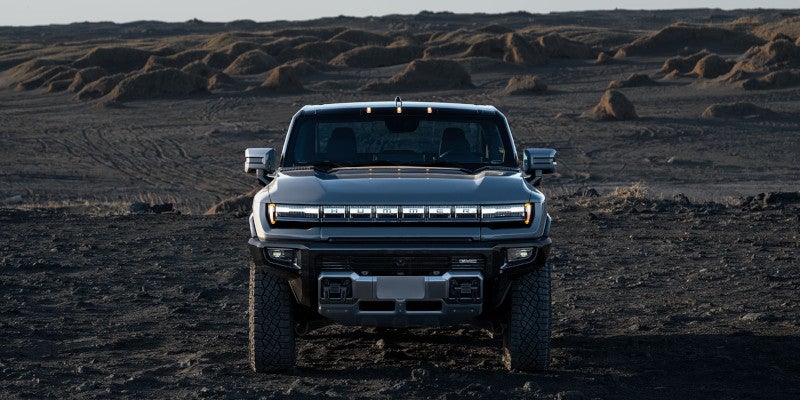
The 2025 GMC HUMMER EV Pickup is designed for strength, durability, and power, both on and off-road. It's also all-electric, giving it even more advantages than a gasoline- or diesel-powered truck. We're going to look at some of its awesome capabilities.

The 2025 GMC HUMMER EV Pickup: Redefining All-Electric Power

Extreme Motor Power

The HUMMER is available in two trim versions, the EV 2x and the EV 3x. The EV 2x has a dual-motor e4WD system, with one motor connected to the front axle and the other to the rear axle. The motors are powered by an Ultium battery pack and produce 570 hp and 7,400 lb-ft of torque. A fully charged battery gives you a range of 318 miles.

The EV 3x features a tri-motor e4WD system, with one motor connected to the front axle and the other two connected to the rear axle. These motors are also powered by an Ultium battery and deliver an incredible 1,000 hp and 11,400 lb-ft of torque. The available Watts to Freedom feature allows you to take advantage of this power by delivering breathtaking acceleration. The EV 3x has a range of 367 miles on a full battery.

Watts to Freedom

As we saw above, this feature is available for the EV 3X and provides lightning-fast acceleration. To activate it, you need to bring your HUMMER to a stop on a closed track with the wheels facing forward. Press the StabiliTrak button on the instrument panel twice, and a pop-up will appear on your infotainment screen to confirm you want to engage Watts to Freedom.

Confirm your choice, and you'll feel your HUMMER lower itself, crouching like an Olympic sprinter. Graphics on the screen will show you the progress as the system prepares. When ready, press down the brake pedal with your left foot, then press and hold the accelerator pedal with your right foot. When prompted, release the brake pedal, and your HUMMER hurtles forward at breathtaking speed, reaching 0-60 mph in 3.0 seconds. It's a rush you have to experience.

Home Backup Power

The HUMMER's powerful battery can power your home in an emergency. Blackouts can occur with little warning, and depending on their cause, power could be out for several days. If this happens, your HUMMER can come to the rescue using its powerful battery to keep your lights on.

When you install the available GM Energy PowerShift Charger and the GM Energy Enablement Kit in your home, your HUMMER can easily supply up to 19.2 kW, which is enough power to power your house for up to two weeks, depending on electricity demands.

​Book your test drive today by contacting us at Vince's GM Center in Burlington, CO.

Posted in:

Related Posts

GM Roadside Assistance Coverage Explained What It Includes and How Long It Lasts

GM roadside assistance is designed to support drivers when a vehicle becomes temporarily inoperable due to common roadside issues. It is not a repair program and it is not insurance. Instead it is a mobility focused service intended to help drivers get back on the road or to a safe location when unexpected situations occur. Understanding how GM roadside assistance works requires clarity around what is included, how long coverage lasts, and how it differs from OnStar roadside services. These distinctions matter for long term ownership planning and for avoiding surprises when assistance is needed. What GM Roadside Assistance Is Designed to Do GM roadside assistance is included with most new GM vehicles during the active warranty period. The service is built around safety and convenience rather than mechanical diagnosis or repair. The primary goal is to: Restore basic mobility when possible Transport the vehicle when mobility cannot be restored Support driver safety during roadside events It is not intended to fix complex mechanical failures on site. Services Typically Included Under GM Roadside Assistance While coverage can vary by model year and warranty type, GM roadside assistance generally includes support for common non collision roadside events. Covered services typically include: Towing to the nearest GM dealer or authorized repair facility Flat tire assistance using the vehicle spare if available Battery jump start services Lockout assistance for keys locked inside the vehicle Emergency fuel delivery with fuel cost typically excluded These services are structured to address the most common reasons vehicles become temporarily disabled during normal operation. Towing Coverage and Limitations Towing is one of the most misunderstood elements of roadside assistance. Key towing considerations include: Towing is typically limited to a specific distance or to the nearest GM service location Coverage applies only when the vehicle is disabled due to a covered event Towing for accidents may fall under insurance rather than roadside assistance Understanding towing limits is important for drivers who travel long distances or live far from GM service centers. How Long GM Roadside Assistance Lasts Coverage duration is directly tied to the vehicle warranty. In most cases: Roadside assistance is included for the duration of the new vehicle limited warranty Coverage may extend longer for certain powertrain warranties depending on model and year Once warranty coverage expires roadside assistance also expires unless extended through other programs Drivers should confirm coverage duration based on their specific vehicle rather than assuming indefinite coverage. Is GM Roadside Assistance Free GM roadside assistance is included at no additional cost during the applicable warranty period. It is not a lifetime benefit and it does not automatically renew. Once coverage expires: Drivers are responsible for roadside service costs Alternative roadside plans may be considered OnStar services may provide continued support depending on subscription status Understanding when coverage ends allows owners to plan ahead rather than react under stress. GM Roadside Assistance vs OnStar Roadside Services GM roadside assistance and OnStar roadside services are often confused because they overlap in function but differ in structure. Key distinctions include: GM roadside assistance is warranty based OnStar roadside services are subscription based OnStar can provide assistance coordination even after warranty expiration OnStar integrates vehicle connectivity for faster location and response OnStar does not replace warranty roadside assistance but can extend roadside support beyond the warranty window. What GM Roadside Assistance Does Not Cover Understanding exclusions is as important as understanding coverage. Roadside assistance typically does not cover: Routine maintenance Mechanical repairs beyond basic assistance Damage from collisions or severe accidents Fuel cost beyond delivery Non emergency towing requests These limitations help define roadside assistance as a support service rather than a repair solution. When Roadside Assistance Makes the Most Difference Roadside assistance is most valuable during unexpected but common disruptions. Examples include: A dead battery after cold weather A flat tire during daily commuting Locking keys inside the vehicle Running out of fuel in unfamiliar areas In these situations the service reduces stress and downtime rather than solving long term vehicle issues. Ownership Planning and Coverage Awareness For GM owners the most important factor is awareness. Knowing when roadside assistance is active and when it expires helps avoid confusion during emergencies. Owners should evaluate: Current warranty status Roadside assistance expiration date OnStar subscription options Driving habits and travel distance This planning ensures support is available when needed rather than assumed. Long Term Ownership Perspective GM roadside assistance is a valuable ownership benefit when understood correctly. It provides short term mobility support and safety reassurance during the warranty period. It is not a substitute for maintenance planning or insurance coverage. Drivers who understand how roadside assistance fits into the broader ownership picture are better prepared for both everyday driving and unexpected situations.

Oil change service.

Essential Oil Change Services at Vince’s GM Center in Burlington, CO

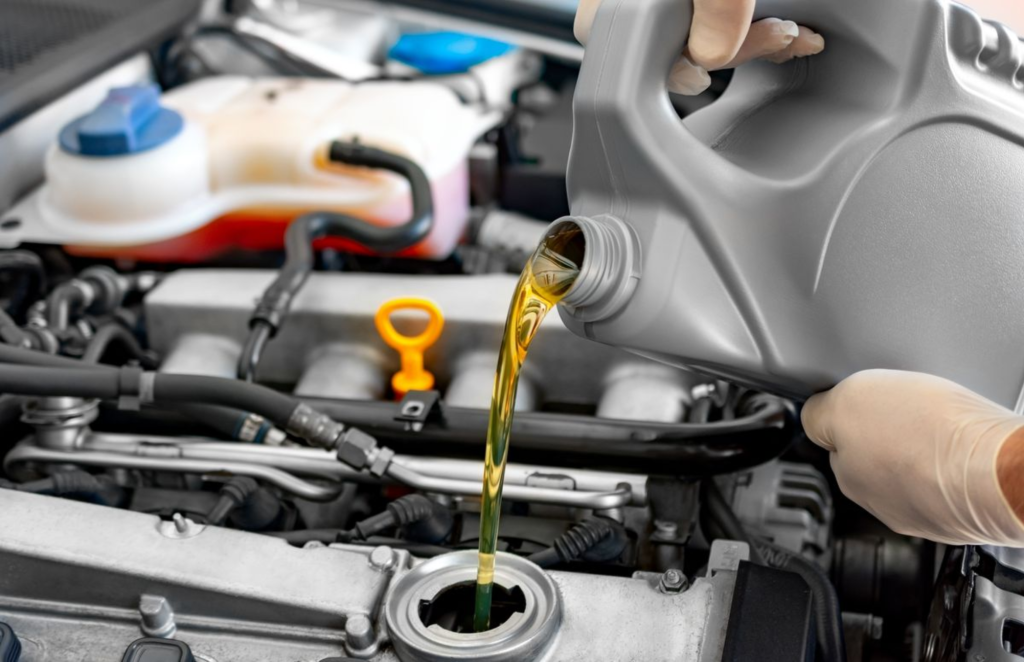
Regular oil changes are one of the simplest yet most effective ways to keep your vehicle running at its best, and at Vince’s GM Center in Burlington, CO, we make this essential service as seamless as possible. Whether you're driving a Chevrolet or a GMC, our Certified Service technicians are trained to understand the specific oil needs of your vehicle, ensuring top-tier performance and longevity. We take pride in providing expert care, using only the highest-quality oils and filters to help keep your engine running smoothly for years to come. Here's a breakdown of the steps involved in our oil change service, so you can know exactly what to expect when you bring your vehicle in for its next oil change. Step 1: Checking Oil Levels and Condition Discuss how the Certified Service technicians start by checking the vehicle's oil level and condition. Explain the importance of ensuring that oil circulates correctly, is at a proper temperature, and is neither leaking nor burning. This helps avoid engine wear and maintains optimal engine health. Step 2: Choosing the Right Oil for Your Vehicle Detail the critical step of selecting the right oil type for each vehicle. Mention the various options available at Vince’s GM Center, such as conventional oil and full synthetic oils. Highlight how technicians recommend specific oils, like ACDelco Gold or Mobil 1™, depending on the model and age of the vehicle, to ensure maximum engine performance. Step 3: Draining Old Oil Describe the process of safely draining the used oil from the vehicle. Discuss how this is an essential step to remove any debris, sludge, and contaminants from the engine, ensuring smooth operation with fresh oil. Step 4: Replacing the Oil Filter Explain the importance of replacing the oil filter during every oil change. Highlight how a new filter helps trap any remaining contaminants and prevents them from entering the engine, promoting better long-term performance. Step 5: Adding Fresh Oil Focus on the process of adding the appropriate fresh oil. Discuss how the correct amount is carefully poured into the engine, with attention paid to the manufacturer’s recommendations for oil capacity and grade. Step 6: Inspecting the Engine and Surrounding Components Talk about the multi-point vehicle inspection that often accompanies the oil change. This includes checking for any leaks, assessing the condition of the exhaust, and verifying that the engine’s other fluids are at optimal levels. This step ensures that all vehicle components are functioning properly, helping avoid future problems. Step 7: Final Check and Road Test Detail how, after the oil change is completed, the vehicle is typically subjected to a final check. The service technicians may take the vehicle for a brief road test to ensure that everything is functioning as it should and that the new oil is circulating effectively through the engine. Step 8: Maintenance Tips and Recommendations Provide helpful tips on maintaining proper oil levels, such as checking the oil regularly and monitoring for oil leaks. Also, mention how the technicians may suggest future maintenance, like tire rotations or brake checks, during the oil change visit. Schedule Your Service Wrap up by encouraging readers to schedule their next oil change at Vince’s GM Center in Burlington, CO, where they can trust certified experts to care for their Chevrolet or GMC vehicle.

GM OnStar: Your Comprehensive Guide to Connected Vehicle Services in 2026

Your Chevrolet may already include connected features you have not tried. Chevrolet OnStar plans explain which services come with your vehicle and which require a separate subscription. If you want emergency assistance, phone controls, or in-car internet, the differences are worth checking. Your vehicle's model year and equipment shape what you can access. Chevrolet OnStar and Its Connected Services OnStar connects eligible Chevrolet vehicles to safety assistance, digital features, and account-based services. A built-in connection lets supported equipment communicate beyond the cabin. However, the vehicle needs compatible hardware, electrical power, and available cellular and GPS signals for particular functions. What does OnStar do when you need assistance? It can connect an eligible Chevrolet to an OnStar Advisor or initiate certain automatic responses. In addition, other features connect the infotainment display, your phone, and information about your vehicle. These functions are related, but they do not all require the same subscription. A Chevrolet Silverado owner might use remote door locks from a phone. An eligible Chevrolet Equinox owner might use built-in navigation or streaming apps. Still, equipment varies by vehicle, trim, and model year. The presence of an OnStar button does not guarantee access to every connected feature. Furthermore, OnStar sits within Chevrolet's wider connected-service offerings. Vehicle Diagnostics, mobile access, and navigation are separate functions with different eligibility rules. Therefore, review each available service individually before changing a plan. Chevrolet OnStar Plans for 2026 OnStar Basics gives eligible 2025 and newer Chevrolet vehicles eight years of core included services. These include Automatic Crash Response, remote commands, supported audio apps, voice assistance, and navigation. However, a particular function still requires compatible vehicle equipment and an active connection. By contrast, older Chevrolet models may have a different package or subscription history. What separates the paid OnStar plans? Each concentrates on a different set of services, while OnStar One combines major categories. Additionally, the current lineup replaces older names such as Safety & Security, Essentials, and Remote Access. Consequently, an older receipt may show a name that no longer appears in the plan catalog. OnStar Connect includes supported audio apps, remote commands, voice assistance, and navigation for eligible vehicles. Check included Basics features first to identify what would be new for your Chevrolet. OnStar Connect Plus adds in-vehicle Wi-Fi and eligible entertainment features, including video, games, and a browser. These functions require compatible infotainment equipment. OnStar Protect provides additional safety services, including Advisor access, roadside support, stolen vehicle assistance, and OnStar Guardian access. Its coverage differs from the core features supplied through Basics. OnStar One bundles safety and connected entertainment services under one subscription. Its precise availability and included functions should be checked against your Chevrolet account. Beyond that, Super Cruise is a separate consideration for appropriately equipped Chevrolet vehicles. It supports hands-free driving on compatible roads, but the driver must remain attentive and ready to respond. A subscription cannot add Super Cruise hardware to a vehicle without it. Plan prices, offers, and trial terms can change. Moreover, the plans available to a 2026 Chevrolet may differ from those offered for an older model. The signed-in account shows eligible options and current terms for that particular vehicle. OnStar Safety and Security Features First, Automatic Crash Response uses vehicle crash information to initiate a connection for assistance when qualifying events occur. An OnStar Advisor can assess the situation and coordinate with first responders when the service connects. Still, a working vehicle connection and other service requirements apply. This function comes with OnStar Basics on eligible newer Chevrolet vehicles. Which additional safety services need a paid plan? OnStar Protect includes Advisor-supported emergency assistance, Roadside Assistance, and Stolen Vehicle Assistance. Those services go beyond the core Basics package. Therefore, verify your active coverage before assuming that every safety function remains available after a trial ends. Additionally, Roadside Assistance can connect you with help for a flat tire or a vehicle that will not start. Stolen Vehicle Assistance works with law enforcement after a theft has been reported. Certain available tools may assist with locating an eligible stolen Chevrolet. However, service access and recovery actions require the relevant plan and vehicle eligibility. Moreover, OnStar Guardian extends selected emergency and roadside features to a compatible phone outside the Chevrolet. Its available functions and access requirements differ from the in-vehicle buttons. The app remains part of OnStar's current Protect offering. Review its permissions and subscription requirements before relying on it away from your vehicle. Still, these services are not substitutes for attentive driving or emergency judgment. If a connection fails, use another available way to contact local emergency services. Remote Access Through the myChevrolet App The myChevrolet mobile app connects your phone with supported controls and vehicle information. Additionally, after account setup, eligible commands travel through connected services to compatible vehicle equipment. Therefore, a Chevrolet must have the necessary hardware and service access to respond. Can you start or unlock your Chevrolet from your phone? Yes, when remote commands are available and the vehicle supports the requested action. Remote start also requires factory-compatible equipment and proper vehicle status. For this reason, a Chevrolet without remote-start hardware cannot gain that function simply by installing the app. For eligible models, the app offers several available actions: Remote key fob commands can lock doors, unlock doors, sound the horn, or start a properly equipped Chevrolet. The vehicle must accept the command through an available connection. Vehicle Locate can show the Chevrolet's position on a map and provide directions back to it. Availability requires the appropriate permissions and connected services. Vehicle Status and Diagnostics can display available tire-pressure, fuel, oil-life, or maintenance information. The specific readouts vary with vehicle equipment and data access. Beyond that, for eligible Chevrolet electric models, the app may also show battery charge information and charging tools. Additionally, certain equipped vehicles can receive navigation destinations sent from a phone. App screens and service permissions can change, so use your signed-in vehicle profile as the final check. Navigation, Wi-Fi, and Connected Entertainment Navigation and Wi-Fi serve different purposes inside a Chevrolet. Supported built-in navigation supplies route information through the vehicle display. An in-vehicle Wi-Fi hotspot creates an internet connection that passengers can use with compatible devices. Consequently, having navigation does not mean that unlimited hotspot data is included. Does your Chevrolet need Connect Plus for Wi-Fi? Connect Plus includes an eligible in-vehicle hotspot and expanded entertainment access. However, OnStar Basics already supplies supported navigation and audio apps in qualifying newer Chevrolet vehicles. Confirm the model's infotainment equipment before comparing subscriptions. Furthermore, the distinction also matters for streaming. Supported audio apps can appear on the center display, while video, games, and browser access require specific equipment and services. Some entertainment functions may have restrictions while the Chevrolet is moving. Moreover, passengers should not assume that a screen supports every app listed in a plan description. Still, connected features rely on network availability and suitable equipment. Cellular reception may weaken in remote areas, and an interrupted connection may prevent a command or stream from working. Therefore, download essential directions or prepare another navigation option before traveling outside reliable coverage. If you are exploring a Chevrolet with particular connected features, review the new Chevrolet inventory. Confirm the chosen vehicle's equipment instead of trusting a plan name alone. Checking Chevrolet OnStar Coverage and Managing Plans First, begin with the Chevrolet model year, compatible equipment, and current subscription status. Next, sign in to your OnStar or Chevrolet account to view included services, active plans, and available upgrades. The Chevrolet OnStar information page at Vince's GM Center also introduces the main service categories. How can you tell what remains after a trial? Your account identifies the features attached to your vehicle purchase and those linked to paid service. For eligible newer Chevrolet vehicles, included Basics features have their own stated duration. By contrast, paid trial features may stop unless you enroll in a qualifying plan. Additionally, to activate or change service, use your vehicle's blue OnStar button or the account's plan-management tools. You may also call OnStar at 1-888-466-7827. Before canceling, confirm exactly which emergency and connected features will remain accessible for your Chevrolet. OnStar's general cancellation guidance warns that services can become unavailable when an account is deactivated. Moreover, review the account's current monthly price, taxes, any trial end date, and plan terms before subscribing. Also check privacy permissions for location-sharing and mobile features. These details make the subscription easier to manage without assuming that every Chevrolet has identical access. With that in mind, if you have questions about a Chevrolet, contact Vince's GM Center in Burlington, Colorado. You can review the available features and decide which services belong in your vehicle before committing to a plan.